Audio looper.
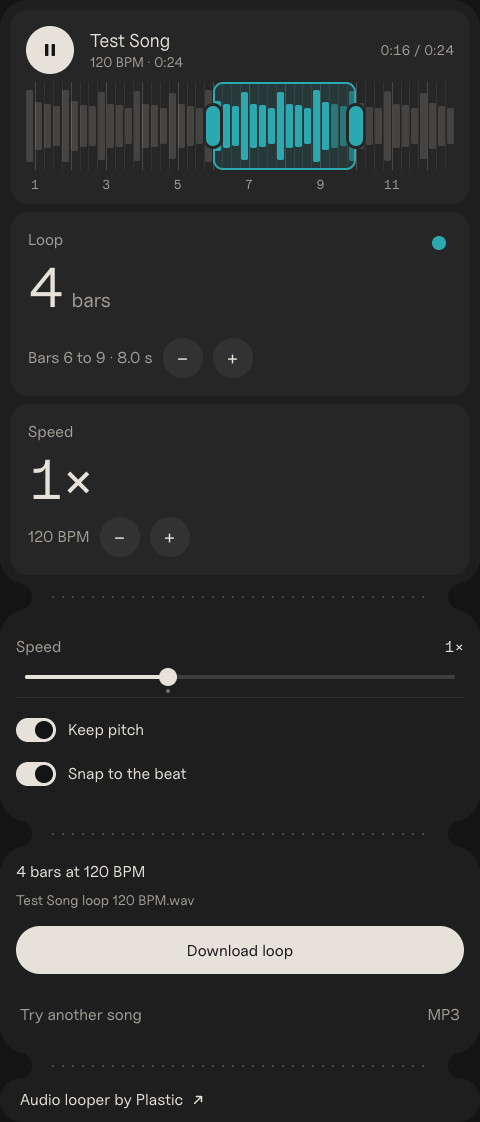
Drop a song and drag over the part you want. It snaps to the beat, loops without a gap, and slows down if you need it.
Size
<iframe src="https://plastic.audio/audio-looper/embed/" width="480" height="1122" title="Audio looper by Plastic" style="border:0;border-radius:28px;max-width:100%"></iframe>
<p><a href="https://plastic.audio/audio-looper/">Audio looper by Plastic</a></p>
Paste it into Google Sites, Canvas or WordPress.
Reading it…
Loop
Speed
Heard a loop you want? DOT records anything playing on your Mac, with its key and BPM, so you catch the sample in the first place. Free to try.
How to loop a song
- Drop in the song (MP3, WAV, M4A or FLAC). Its tempo is found, and the wave gets a line on every beat.
- Drag over the part you want. The ends snap to the beat, so the loop comes round in time.
- Make it longer or shorter with − and +: 1, 2, 4, 8 or 16 bars.
- Download the loop as a WAV or an MP3, ready to drop in your DAW.
Time stretch: slower or faster, same pitch
Speed goes from 0.5× to 2×. With Keep pitch on, the loop changes tempo but stays in its key, so a 120 BPM loop at 0.75× plays at 90 BPM and still fits your song. Turn it off for the tape sound, where slower is lower.
Loop a part to learn it
Stuck on a riff or a fill? Loop those two bars, drop the speed to 0.75× and play along until it sits, then bring it back to 1×. The pitch stays put, so you can tune to it.
Make a loop for your beat
The loop is cut on the beat, so it lines up in any DAW. The file is named with its tempo, like Song loop 120 BPM.wav, so you know where to set the grid.
Press Record. Whatever your Mac plays, recorded.
Records any sound on your Mac, plus your mic, guitar or turntable, with each take's key, tempo and chords.

Questions.
Does the loop click where it repeats?
No. The loop is cut on the beat, and the seam gets a short crossfade, so it comes round without a click.
What if the beat isn't found?
Turn off Snap to the beat and drag the loop anywhere. The length then shows in seconds instead of bars.
Is my file uploaded?
No. Everything happens in your browser. The file never leaves your computer.
What files work?
MP3, WAV, AIFF, M4A and FLAC. You get the loop as a WAV or an MP3.
Time-stretching: Signalsmith Stretch, MIT · MP3: LAME, LGPL (lame.sourceforge.net)