Vocal chops maker.
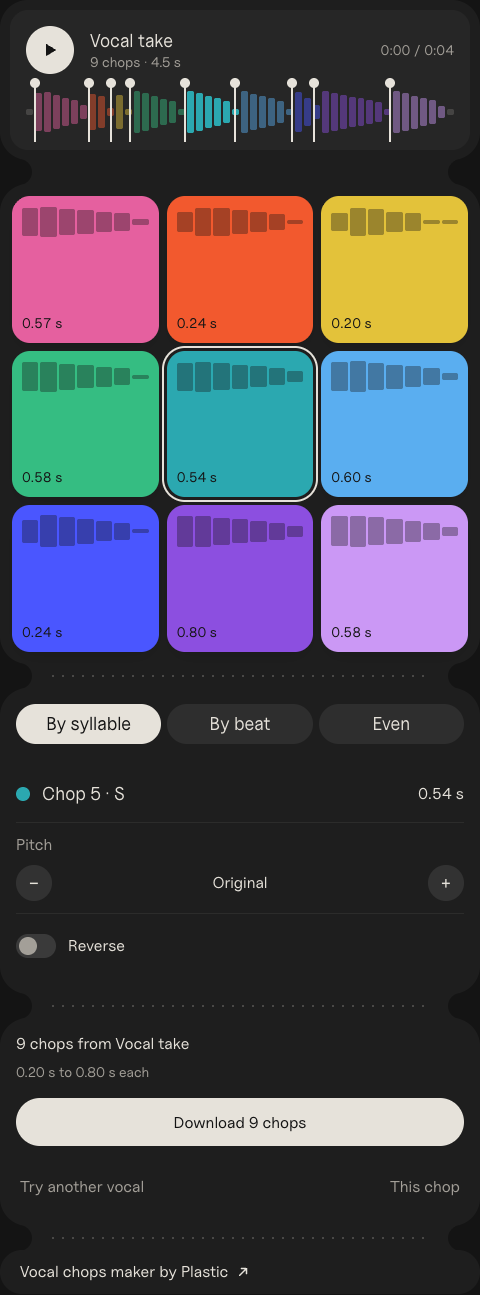
Drop a vocal or an acapella. It's cut on the syllables into nine pads you play with your keyboard, ready to download as WAVs.
Size
<iframe src="https://plastic.audio/vocal-chops/embed/" width="480" height="1295" title="Vocal chops maker by Plastic" style="border:0;border-radius:28px;max-width:100%"></iframe>
<p><a href="https://plastic.audio/vocal-chops/">Vocal chops maker by Plastic</a></p>
Paste it into Google Sites, Canvas or WordPress.
Reading it…
Heard a vocal you want to chop? DOT records anything playing on your Mac, with its key and BPM, so you catch the sample in the first place. Free to try.
How to make vocal chops
- Start with a dry vocal: an acapella, or a take of your own.
- Cut it on the syllables, one sound to each chop. Here that happens when you drop the file.
- Play the chops on pads over your beat until a new hook comes out. Here that's Q W E, A S D and Z X C.
- Pitch some, reverse some, and keep the ones that sing. Then download them and put them in your sampler.
What are vocal chops?
Short slices of a vocal, a syllable or a word each, played as an instrument. The words stop mattering and the voice becomes a melody. You hear them in house, future bass and pop drops, where a chopped hook answers the singer.
Move a cut, change a chop
Drag a line on the wave to move a cut, and both chops beside it follow. Pick a pad to pitch it up or down a half step at a time, or reverse it for a swell into the next beat.
Download the chops
Download all nine at once, or just the pad you picked. Each chop is a WAV named by its pad, like Vocal take chop Q.wav, ready for any sampler or DAW.
Press Record. Whatever your Mac plays, recorded.
Records any sound on your Mac, plus your mic, guitar or turntable, with each take's key, tempo and chords.

Questions.
Can I chop a vocal from a famous song?
For practice, yes. To release it, you need permission from whoever owns the recording and the song. Your own vocals, or packs sold as royalty-free, are safe to use.
How are the cuts found?
It listens for where each sound starts, the jump in level at a new syllable, and keeps the nine clearest. By beat cuts on the song's beats instead, and Even cuts nine equal slices.
Is my file uploaded?
No. Everything happens in your browser. The file never leaves your computer.
What files work?
MP3, WAV, AIFF, M4A and FLAC. The chops come out as WAVs.