Which way fits
| Screenshot toolbar | A recorder app | BlackHole | |
|---|---|---|---|
| You get | A screen video with sound | An audio file | A virtual input any app can record from |
| Setup | None | Install the app, allow one permission | Install a driver, restart, build a Multi-Output Device |
| macOS | 27 or later | 14.4 or later | Older versions too |
| One app only | No, the whole Mac | Yes (DOT, Audio Hijack) | No |
| Cost | Free | DOT: 10 recordings free, then $49 once. Audio Hijack: $69 | Free (donation welcome) |
What QuickTime and Voice Memos can't do
QuickTime Player's New Audio Recording lets you choose a microphone and a quality, and nothing else. Voice Memos records from a microphone too. Neither can hear what your Mac is playing. Holding the Mac's microphone up to its own speakers gets you the room, the fan and the keyboard along with the sound.
1. On macOS 27: the Screenshot toolbar
Since macOS 27 (Golden Gate), Apple's own screen recording can include the Mac's sound.
- Press ⌘⇧5 to open the Screenshot toolbar.
- Choose Record Entire Screen or Record Selected Portion.
- Click Options and choose Include System Audio.
- Click Record, play the sound, then click the stop button in the menu bar.
- To keep only the sound, open the recording in QuickTime Player and choose File › Export As › Audio Only.
It's free and built in. The catches: it records a video of your screen, it captures everything (notification sounds included), and it isn't available on macOS 26 or earlier.
2. On macOS 14.4 or later: a recorder that captures the Mac's sound
Since macOS 14.2, Apple lets apps record the Mac's sound with one permission instead of an audio driver. Recorders built this way install nothing in the system, and many can record a single app.
“Some days a song just won’t come, and nothing I try lands. Then a few chords on YouTube spark a melody. I built DOT to catch that spark, drag it into my DAW and play it with my own sounds.”
Kai Williams, who made DOT
With DOT:
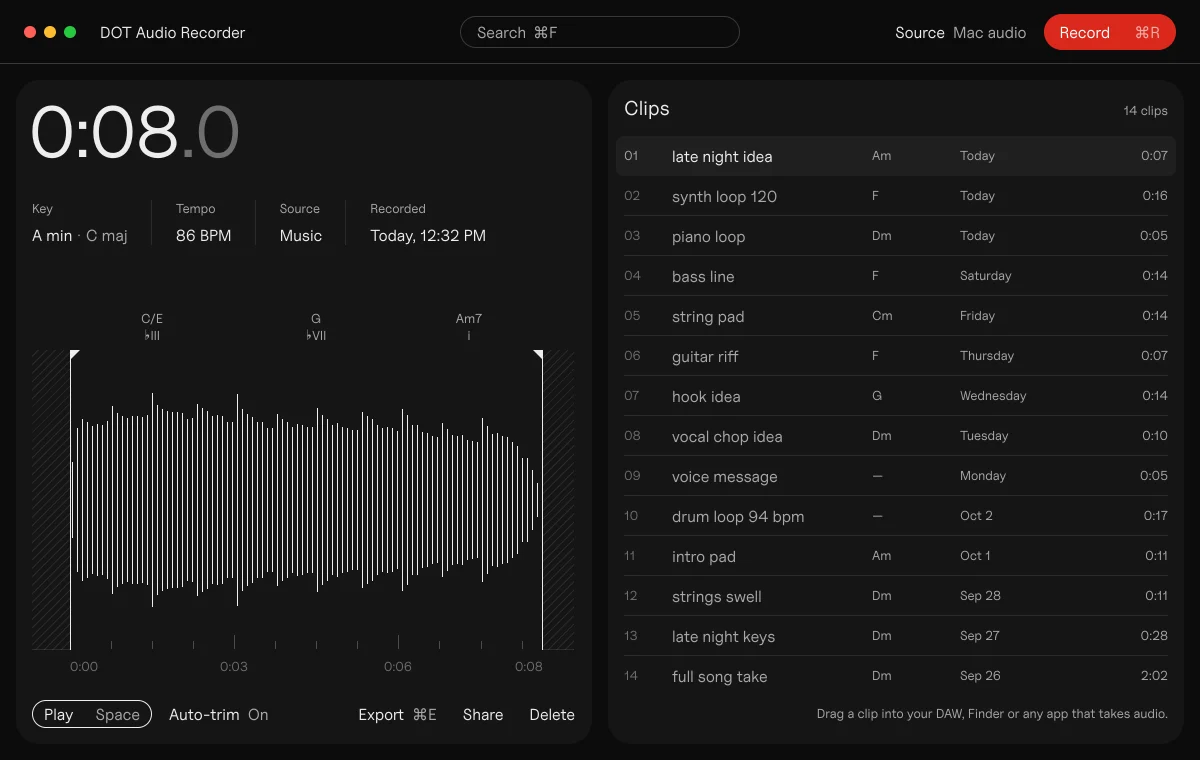
- Open DOT and leave the source on All Mac audio, or pick one app (Safari, Music, your DAW) so nothing else gets in.
- Press ⌘R while the sound plays.
- Press ⌘R again to stop and keep it. The clip lands in your library trimmed, with its key, tempo and chords, ready to drag into your DAW or Finder as a WAV, AIFF or M4A file.
The first time, macOS asks you to allow Screen & System Audio Recording. That's the permission Apple uses for any app that records the Mac's sound; DOT uses only the audio, never your screen. While anything records the Mac's sound, macOS shows a purple dot in the menu bar.
Other recorders: Rogue Amoeba's Audio Hijack ($69, macOS 14.4 or later) records any app or the whole system. It adds effects and scheduled recordings, which makes it great for podcasts and streams. OBS Studio (free) records the screen with system audio on macOS 13 or later.
3. On any macOS: BlackHole
BlackHole is a free, open-source virtual audio device. Your Mac plays into it, and any app (a DAW, Audacity, OBS) can record from it as if it were a microphone. To hear the sound while you record, you combine your speakers and BlackHole into a Multi-Output Device. That takes about ten minutes, and your volume keys stop working while it's on.
It's the right tool when you need to send one app's sound into another live, or when your Mac is older than macOS 14.4. Our BlackHole guide walks through the setup and how to remove it.
Record only what you have the right to use
Recording what your Mac plays is fine for listening back, learning, transcribing and sketching ideas. Before a recorded sample goes into a release, clear it with whoever owns it.
Questions
Can a Mac record internal audio without extra software?
On macOS 27, yes: the Screenshot toolbar (⌘⇧5) has Include System Audio for screen recordings. On earlier versions, no. QuickTime and Voice Memos record microphones only.
Why does my Mac screen recording have no sound?
Before macOS 27, the Screenshot toolbar records the microphone, not the Mac's sound. On macOS 27, open Options and choose Include System Audio before you record.
Do I need BlackHole to record my Mac's audio?
Not on macOS 14.4 or later. Recorders like DOT and Audio Hijack capture the Mac's sound directly. You need BlackHole (or Loopback) to send live audio from one app into another.
What is the purple dot in my menu bar?
macOS shows it while an app is recording your Mac's sound or screen. Click Control Center to see which app it is.
Can I record just one app, like Safari?
Yes, with a recorder that supports it. In DOT, pick the app in the source menu before you press ⌘R; notifications and other apps stay out of the recording.
Sources
- Take a screenshot or screen recording on Mac, Apple, 14 September 2026
- Record audio in QuickTime Player, Apple
- Capturing system audio with Core Audio taps, Apple Developer
- Allow apps to record your system audio, Apple
- Audio Hijack, Rogue Amoeba
- OBS macOS screen capture source
- BlackHole, Existential Audio
 DOT5 min read