Three ways, compared
| Online finder | By ear | Record it with DOT | |
|---|---|---|---|
| Works on | Songs in Spotify's catalog, or a file you have | Anything | Anything your Mac plays |
| You get | Key and BPM | The key | Key, BPM, chords, and the clip itself |
| Time | Seconds | A few minutes | As long as the part plays |
| Cost | Free | Free | 10 recordings free, then $49 once |
1. Use a free online key and BPM finder
When you have the song as a file, or it's a released song on Spotify, a web finder is the quickest answer.
- Tunebat: search a released song by name, and it shows the key and BPM from Spotify's own estimates. Its Analyzer takes your own MP3, WAV, FLAC, AAC, OGG or M4A file and analyzes it in your browser, so the file isn't uploaded.
- vocalremover.org Key BPM Finder: drop in one or more files and get the key, major or minor, and the BPM in a few seconds.
- LANDR's Key & BPM Finder: free, in the browser, for MP3, WAV, OGG, FLAC or AAC files. It then suggests samples in the same key.
What they can't do: they need the song in the catalog or as a file. A loop in a YouTube video isn't a file. Neither is a synth preset's demo, a loop-pack preview in a browser tab or the beat on a friend's laptop. You'd have to record them first.
2. Find the key by ear
It takes a few minutes and some practice, and it's worth learning. You need a keyboard (a MIDI keyboard or your DAW's typing keyboard is fine).
- Find the home note. Play single notes over the song until one sounds right almost everywhere, as if the song could end on it. That's the tonic.
- Check it. The note five steps up (the fifth) should also sound stable, and the note a half step below should pull up into it.
- Major or minor. Over the song, play the note three half steps above the tonic (the minor third), then four (the major third). Whichever one fits tells you: minor or major.
- Check against the chords. The tonic chord usually comes back at the ends of phrases and at the end of the song.
3. Record it with DOT and read the key, BPM and chords
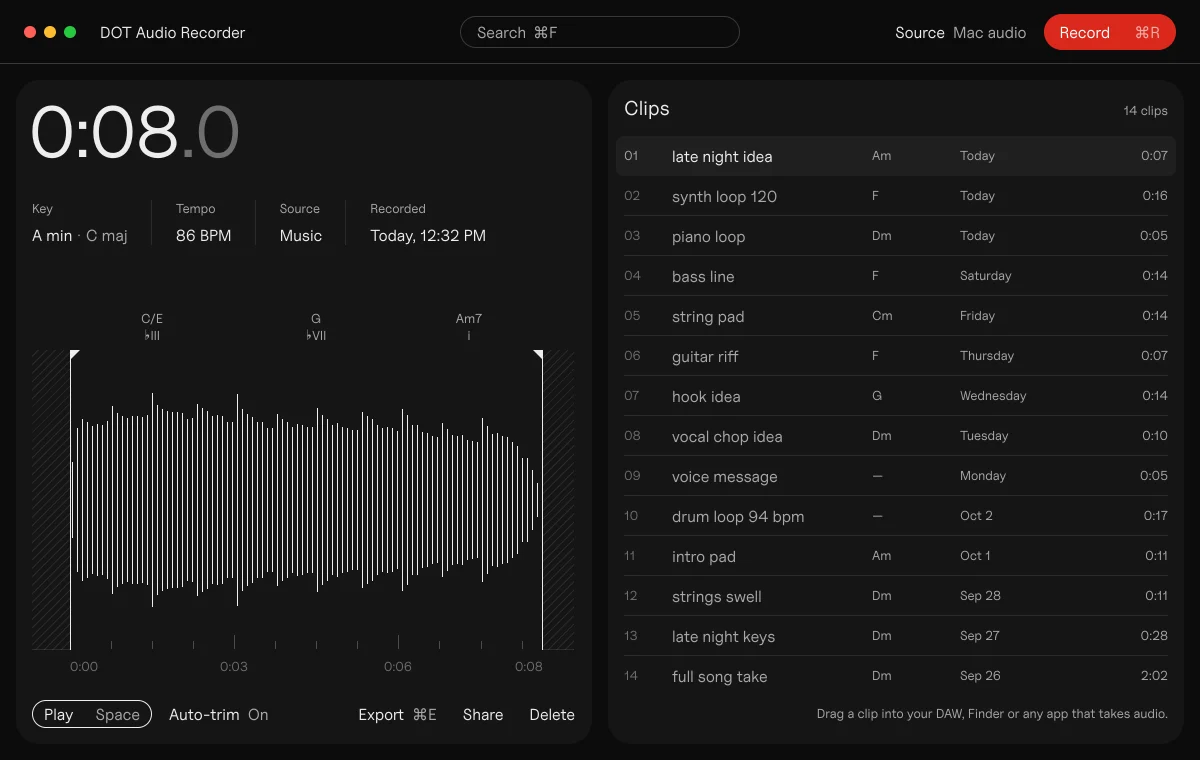
DOT is a Mac recorder for producers. It records whatever your Mac is playing (any app, or all of them) and analyzes each recording: the key, the tempo, and a chord for every half bar. There's no audio driver to install and nothing to reroute, on macOS 14.4 or later.
- Open DOT and leave the source on All Mac audio, or pick the app that's playing (Safari, Music, your DAW).
- Play the part you want, and press ⌘R.
- Press ⌘R again to stop and keep it. The clip lands in your library trimmed to the sound, with its key, BPM and chords.
- Drag the clip into your DAW as a normal audio file, or export its chords as MIDI (⇧⌘E) and play them with your own sounds.
It works on anything that makes sound on your Mac: a YouTube video, a stream, a plugin's preset browser, a sample pack's previews, a voice memo.
“Some days I play chords on Push 3 and nothing moves me enough to start a melody. Then I watched a video of someone clicking through Arturia presets, and a few of those chords had melodies and lyrics coming to me. I wanted to keep them and play them later with my own sounds, in Serum or Analog Lab. DOT came out of that.”
Kai Williams, who made DOT
Why key finders disagree, and what to do about it
Every finder, DOT included, makes the same few kinds of mistake. Once you know them, they're quick to fix.
- Major or its relative minor. C major and A minor use exactly the same notes, so a finder can hear either. It's the most common error: Capo's own guide says so, and research scoring gives a "relative key" answer partial credit because it's a near miss. If the song feels happy and resolves on C, it's C major; if it feels darker and resolves on A, it's A minor.
- Songs that change key, or never settle on one. A finder gives you the most likely key overall; listen to the part you need.
- Half or double tempo. A 140 BPM trap beat in half time can read as 70, and a slow song can read at double. Sound On Sound and Ableton's manual both describe this; DAWs have ×2 and ÷2 buttons for it. Tap your foot: the number your foot agrees with is the right one.
When DOT isn't sure, it says so. Instead of guessing, it shows both answers, such as "E minor · G major" or "94 BPM · 188". One click switches to the other.
Other tools worth knowing
- Mixed In Key ($58 once) analyzes your music files for key, BPM and energy, and labels them with the Camelot Wheel for DJs. Mixed In Key Live shows the key of whatever is playing on your Mac, as it plays.
- Capo (Mac and iPhone) finds the beats, chords and key in songs you own, and lets you correct them. Exporting MIDI on the Mac needs Pro ($39.99 a year).
- Chordify shows the chords of popular songs. MIDI download needs Premium ($42 a year).
- Logic Pro 12 has Chord ID: drop a region on the Chord track and it finds the chords. Analyze Key Signature then works out the key from them. Smart Tempo finds the tempo.
- Ableton Live 12 estimates a song's tempo when you drop it in (Auto-Warp). It doesn't detect the key of audio: you set a clip's scale yourself.
Questions
Why does my key finder say A minor when the song is in C major?
C major and A minor share every note, so finders often swap them. Listen for the note the song resolves to: C means C major, A means A minor.
Can I find the key of a YouTube video?
Yes. Play it and record it with DOT, which gives you the key, tempo and chords, or use a tool that listens live, like Mixed In Key Live. The online finders need a file.
Is BPM the same as tempo?
Yes. BPM (beats per minute) is how tempo is measured. Finders sometimes report half or double the real tempo; tap along to check.
What is the Camelot Wheel?
Mixed In Key's chart of the 24 keys for DJs. Keys get a number and a letter (A for minor, B for major), and neighbours on the wheel mix well together.
What's the most accurate key finder?
None is right every time, because the same notes can belong to two keys. Pick one that shows its second guess, and check it by ear.
Sources
- Tunebat Analyzer
- vocalremover.org Key BPM Finder
- LANDR Key & BPM Finder
- Capo user guide: override the detected key
- mir_eval key scoring
- Logic Pro X time-stretching and project tempo, Sound On Sound
- Audio clips, tempo and warping, Ableton Live 12 manual
- Finding the key, Theta Music Trainer
- Mixed In Key shop and Camelot Wheel
- Chordify Premium and Capo pricing
- Logic Pro: analyze the key signature of a range of chords, Apple
 DOT5 min read